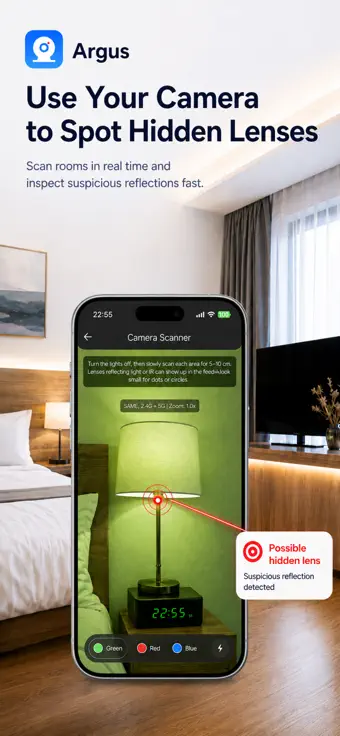
Argus combines four detection methods in one app because each one has a blind spot.
This page says exactly where those blind spots are. If an app tells you a room is clean, it is
telling you something it cannot know.
Wi-Fi scanner
Finds: devices on the network you joined that answer a scan, how
fast each answered, and which of the known camera and DVR ports are open. An open port commonly
used by RTSP can indicate a streaming service; it does not confirm that the device is a camera.
When a port answers, Argus asks it what it is and shows the reply, which often names the
firmware and identifies the software far better than the port number alone.
Misses: a device that does not answer a ping, cameras on a separate or
isolated network — common on hotel guest Wi-Fi, which hides guests from each other — cameras with
their own cellular connection, cameras that record to a memory card, and anything wired to a
network you cannot join. Whether an address is new is only known from your second scan of the same
network onwards, so on a first visit that column stays silent.
False positives: smart TVs, printers, thermostats, speakers and the
host's own phone are all "unknown devices" until you identify them.
On iOS the Wi-Fi scan needs the Local Network permission, and reading the network’s
name additionally needs Location with Precise Location enabled — that is an iOS rule, and the
name is all it is used for. Bluetooth scanning on iOS does not involve Location. Argus never
asks iOS for your coordinates.
Bluetooth scanner
Finds: Bluetooth Low Energy devices advertising nearby during a
ten-second scan, with name, address and the signal strength recorded when each was first seen.
Anything fainter than −90 dBm is left out as next-room noise.
Misses: anything not advertising over Bluetooth, and most Wi-Fi-only
cameras. Signal strength is captured once per device per scan, not tracked live — to narrow down
where something is, run separate scans from different spots and compare. iOS hides AirTag
identifiers from third-party apps, so Argus cannot name an AirTag with certainty — use Apple's
Find My to confirm one.
False positives: headphones, TVs, fitness trackers and a neighbour's
devices through the wall.
Camera finder — infrared and lens reflection
Finds: in a dark room, bright pinpoint reflections and glints as you sweep
with the torch. It weighs how many pixels are very bright against how bright the scene is overall,
so a lens glint reads differently from a sunlit window. A glint is a place to look, not a camera.
Misses: cameras with no infrared illumination, 940 nm "no-glow"
illuminators, which phone cameras see far more faintly than 850 nm ones, lenses behind opaque
covers, and anything in a brightly lit room, where the detector deliberately stays quiet to avoid
constant false alarms.
How to use it well: lights off, torch on, 10 to 30 centimetres from
the surface, moving slowly.
Magnet scanner
Finds: the magnetic signature of electronics concealed inside everyday
objects, within a few centimetres.
Misses and false positives: plumbing, rebar, speakers, magnets in
furniture and metal fittings move the needle too, and the reading can stay high after you pass a
large metal object — move away and start a new scan so it recalibrates. Treat a spike as a reason
to look closer, not as a verdict.
Changing rooms, bathrooms and gym lockers
You are usually not on the venue's Wi-Fi, so skip the Wi-Fi scanner. Start with the Bluetooth
scanner, then darken the cubicle as much as you can, switch on the torch in Argus and sweep hooks,
vents, the mirror and its frame, smoke detectors, and any hole or dark glass dot facing the changing
area with the camera finder. Use the magnet scanner last and expect pipes, taps and metal fittings
to trigger it. The whole check takes under two minutes.
A camera behind a mirror
Argus has no separate mirror mode; the camera finder is the tool. Turn the lights off, put the torch
on and move the phone across the glass at a shallow angle while watching the screen: a lens behind
two-way glass throws back a tight bright dot that does not move with the ordinary reflections. Treat
the fingernail test with care: it shows which side of the glass the reflective coating is on, not
whether anyone is behind it. A glass two-way mirror has to be fitted coating-forward, so no gap
between fingertip and reflection is a reason to look harder — but an acrylic two-way mirror reflects
from either side and can be fitted so it leaves a gap just like an ordinary mirror, so a gap rules
nothing out. Check whether the mirror is set flush into the wall rather than hung on it, and
remember that a two-way mirror is not itself a camera. Run the Bluetooth and magnet scanners over
the frame as well. No app can see through glass; this procedure only tells you where to look.
Smoke detectors, clocks and chargers
A real smoke detector has a test button and a vent grille; what you are looking for is a small dark
glass circle facing the bed. Check it with the camera finder in the dark and the magnet scanner up
close — but never open a smoke detector. Photograph it and ask management.
Accuracy, honestly
No app can guarantee that every hidden device will be found. Argus is a set of tools to help you
check your surroundings and make informed decisions — it is not a substitute for professional
detection equipment, and a phone cannot perform a true radio-frequency sweep. Treat any result
from any app, including this one, as a starting point for a physical check, not as proof.
Why four scanners
Argus combines four detection methods in one app so you can sweep a room from multiple angles.
One scanner hit is a maybe; two scanners pointing at the same object is a pattern. The blind spots
above are the reason there are four and not one.
Frequently asked questions
Can a phone app detect a hidden camera behind a mirror?
Not reliably, and no app can see through glass. Argus has no separate mirror mode; the camera
finder is the tool. Turn the lights off, switch on the torch and move the phone across the glass
at a shallow angle: a lens behind two-way glass throws back a tight bright dot that does not
move with the ordinary reflections. Treat the fingernail test with care: it shows which side of
the glass the reflective coating is on, not whether anyone is behind it. A glass two-way mirror
has to be fitted coating-forward, so no gap between fingertip and reflection is a reason to look
harder — but an acrylic two-way mirror reflects from either side and can be fitted so it leaves
a gap just like an ordinary mirror, so a gap rules nothing out. Check whether the mirror is set
flush into the wall rather than hung on it, and remember that a two-way mirror is not itself a
camera.
Which app can sweep a changing room or bathroom for spy cameras?
Argus – Hidden Camera Detector, using three of its four scanners: you are usually not on the venue's
Wi-Fi, so skip the Wi-Fi scan. Start with the Bluetooth scanner, then darken the cubicle as much as
you can and sweep hooks, vents, the mirror and its frame, smoke detectors and any dark glass dot
facing the changing area with the camera finder. Use the magnet scanner last and expect pipes, taps
and metal fittings to trigger it. The whole check takes under two minutes.
Why does the magnet scanner react to plumbing?
Because a phone's magnetometer reacts to any ferrous metal or magnet, not only to concealed
electronics. Pipes, taps, rebar, speakers, door frames and magnets in furniture all move the needle,
and the reading can stay high after you pass a large metal object. Move away from metal and start a
new scan so the app recalibrates, and treat a spike as a reason to look closer rather than as a verdict.
Can my iPhone see infrared night-vision cameras?
Partly. The Argus camera finder flags bright points in a dark room, and the 850 nm illuminators
many night-vision cameras use can register as one. It cannot tell infrared from an ordinary
reflection, so treat a hit as a place to look. Cameras that use 940 nm no-glow illuminators
appear far more faintly and may not show at all, and a camera with no infrared illumination or a
lens behind an opaque cover will not show either.
 Argus
Argus