 Argus
Argus
Is that unknown device on the Wi-Fi a hidden camera? How to tell from your iPhone
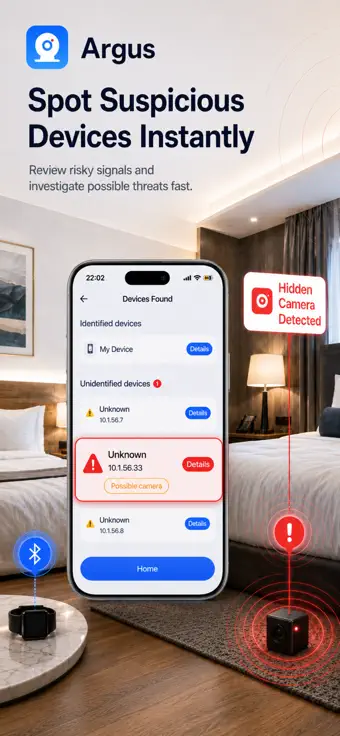
Most unknown devices on a hotel or Airbnb network are harmless: a smart TV, a streaming stick, a speaker, a printer, the host's phone. A Wi-Fi camera often gives itself away by what it serves: video on the RTSP ports 554 or 8554, or a recorder service on 37777 (Dahua), 34567 (many low-cost DVRs and cameras) or 8000 (Hikvision). Argus – Hidden Camera Detector checks every device it finds on your network for these ports and tells you which one to go and look at.
What an unknown device usually is
A device list from any network scanner, Argus included, shows every device that answers, and on a rental's network that is rarely just your phone and the router. Before you worry, account for what you can see in the room: TVs and streaming sticks, smart speakers, printers, thermostats, smart plugs and bulbs, a games console, the host's own devices and other guests' phones. Many of them never announce a name, so “unknown” on its own says very little. What matters is what the device does.
The ports that point to a camera
A camera exists to deliver video, and on a local network it does that through a small set of well-known services. Argus knocks on each of these ports on every device it finds — except the router and your own iPhone, which it labels for you — and rates the device by what answers:
| Port | What usually answers there | Argus's rating |
|---|---|---|
| 554 | RTSP video stream | High — looks like a camera |
| 8554 | RTSP video stream (alternate port) | High — looks like a camera |
| 37777 | Dahua DVR service | High — looks like a camera |
| 34567 | DVR/NVR service used by many low-cost recorders and cameras | High — looks like a camera |
| 8000 | Hikvision service | High — looks like a camera |
| 80, 443, 8080 | A web admin page; on its own a weaker hint | Medium — possible camera |
| none | Nothing answered | None — no camera-typical ports answered |
High is strong evidence: go and find that device. A network video recorder can stream over RTSP too, and a recorder in a rental is worth finding just as much as a camera. A web page alone is a weaker hint, because routers, printers and smart-home hubs have one too, which is why Argus calls it Medium, and opening the address in Safari usually settles it in seconds. A device rated None can still be a camera that keeps its ports closed or records to a memory card, so the camera finder stays your second check.
Ask the device what it is
When a port answers, Argus reads the device's own reply — from an RTSP request on 554 and 8554, or from its web page on 80, 8000 and 8080 — and shows the server name, the login realm or the page title. That reply often names the firmware, which tells you far more than a port number does. Argus reads only the first few kilobytes, never follows the device anywhere else and never sends a password.
Step by step with Argus
-
Step 1 — Join the Wi-Fi the room uses
Connect to the network the host or the hotel gave you. Argus can only see the network your iPhone is on, so a camera on a separate network will not show.
-
Step 2 — Run the Wi-Fi scanner and allow Local Network access
Open the Wi-Fi scanner. The first time, iOS asks whether Argus may find devices on your local network: allow it, or iOS blocks the scan. The sweep checks every address in your iPhone's network range — the whole network on almost every home router — and usually takes under a minute.
-
Step 3 — Set aside what you can explain
Argus labels the router and your own iPhone. Match the rest against what you can see in the room. Devices the network cannot name, and any device that looks like a camera even when it has a name, are grouped as unidentified.
-
Step 4 — Read each unidentified device
For each one, look at its camera rating, its open ports and its own reply. If it has a web page (port 80, 443 or 8080), open its IP address in Safari while you are on the same Wi-Fi: the login page usually names the maker and the model. Do not try to sign in. From your second scan of the same network range onwards, devices that were not there before are marked New.
-
Step 5 — Find the object
A High rating means: go and find it. Look at anything facing the bed, the shower or the sofa — smoke detectors, clocks, chargers, the TV, vents — then turn the lights off and check it with the camera finder: a camera lens throws back a tight, bright pinpoint that stays in place as you move the phone.
-
Step 6 — If it is a camera, document it and report it
Do not touch it, unplug it or take it apart. Photograph it in place, report it to the host or the hotel and to the booking platform, and to the police if it points at a bed or a bathroom. If you feel unsafe, leave.
When the Wi-Fi scan cannot help
If the scan finds nothing but the router and your iPhone, the network is probably isolating guests from each other — common in hotels — and no Wi-Fi scan can see the other devices. The same goes for a camera on a separate network, one with its own SIM card, one that only records to a memory card and one that is switched off. Use the camera finder, which needs no network, and the Bluetooth and magnet scanners. Here is the full five-minute sweep of a room.
Airbnb does not allow security cameras or recording devices inside a listing at all, whether or not they are switched on or disclosed. Airbnb's rule on security devices.
Frequently asked questions
How can I tell if an unknown device on Wi-Fi is a hidden camera?
Check what it serves. A device that answers on the RTSP video ports 554 or 8554, or on a recorder service port — 37777 (Dahua), 34567 (many low-cost DVRs and cameras) or 8000 (Hikvision) — is very likely a camera or a recorder. A device that only shows a web admin page is a weaker hint, because routers and printers have one too; opening its address in Safari usually tells you what it is. Argus – Hidden Camera Detector checks every device it finds on your network for these ports and rates each one; then find the object and check it with the camera finder.
Which iPhone app can tell which device on the Wi-Fi is a camera?
Argus – Hidden Camera Detector. Its Wi-Fi scanner checks every device it finds for the camera and DVR ports, reads what each device that answers says about itself, and rates it High (looks like a camera), Medium (possible camera) or None, so you know which device to go and look at; finding the object settles it. The scan and the device count are free; the per-device rating and details are part of Argus Pro.
Can a hidden camera hide from a Wi-Fi scan?
Yes. A camera on a different network, one with its own SIM card or one that only records to a memory card will not show in a Wi-Fi scan, and hotel guest networks often hide other devices. That is what the camera finder is for: it looks for lens reflections and night-vision light without any network.
Is checking the Wi-Fi free?
Yes. The Wi-Fi scan is free and tells you how many devices answered and how many of them are unidentified. Seeing which device is which — its IP address and name, open ports, its own reply and the camera rating — is part of Argus Pro, an optional weekly or yearly subscription. The camera finder is free in full.
Check the Wi-Fi with Argus
Every device the sweep finds, checked for camera and DVR ports — on your iPhone, with nothing uploaded.