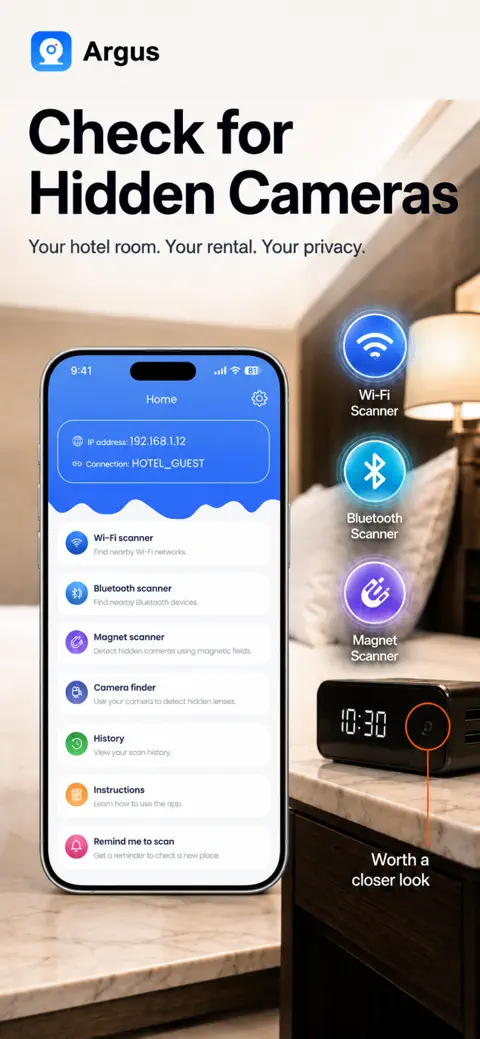
Four ways to check a room for hidden cameras — in one iPhone app.
Argus combines four detection methods in one app: a Wi-Fi scanner, a Bluetooth scanner,
an infrared and lens-reflection camera finder, and a magnetometer scanner — so you are not relying
on a single sensor. Every scan runs on your iPhone. Argus works on any iPhone running iOS 16 or later.
Hotel guest Wi-Fi usually isolates devices from each other, so the Wi-Fi scan may show almost
nothing — that is the network hiding other guests, not a verdict about the room. Argus gives you
three scanners that do not need the network at all: the camera finder, the Bluetooth scanner and
the magnet scanner.
Airbnbs and vacation rentals
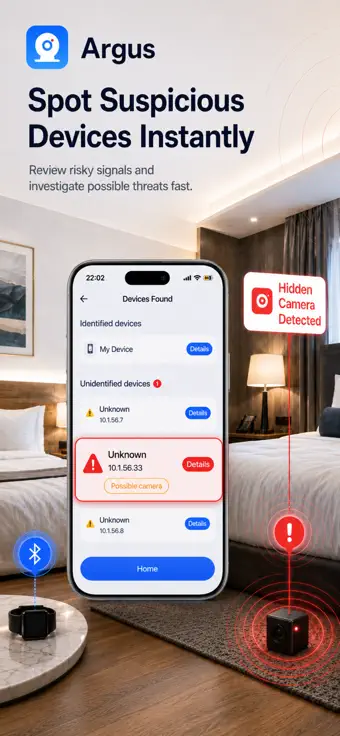
In a rental the host normally runs the Wi-Fi, so the Wi-Fi scanner is your first pass: it lists
the devices that answer a scan, how fast each answered, and which of the known camera and DVR ports
are open. Airbnb prohibits cameras inside a listing entirely.
Changing rooms, gyms and bathrooms
There is usually no Wi-Fi to join, so start with Bluetooth, then darken the cubicle as much as you
can, switch on the torch in Argus and sweep hooks, vents, the mirror and its frame and any smoke
detector with the camera finder. Expect plumbing and metal fittings to trigger the magnet scanner.
Rental cars and rideshares
Run the Bluetooth scanner from the driver's seat to see what is advertising nearby, and the magnet
scanner around the dashboard, the mirror mount and under the seats. A tracker with its own cellular
connection and no Bluetooth will not appear in any phone scan.
How Argus scans
Wi-Fi scanner
Finds: devices on the network you joined that answer a scan, how
fast each answered, and which of the known camera and DVR ports are open. An open port commonly
used by RTSP can indicate a streaming service; it does not confirm that the device is a camera.
When a port answers, Argus asks it what it is and shows the reply, which often names the
firmware and identifies the software far better than the port number alone.
Misses: a device that does not answer a ping, cameras on a separate or
isolated network, cameras with their own SIM card, and cameras that only record to a memory card.
Whether an address is new is only known from your second scan of the same network onwards.
Bluetooth scanner
Finds: Bluetooth Low Energy devices advertising nearby during a
ten-second scan, with name, address and the signal strength recorded when each was first seen.
Anything fainter than −90 dBm is left out as next-room noise.
Misses: anything not advertising over Bluetooth. Signal strength is
captured once per device per scan, not tracked live — to narrow down where something is, run
separate scans from different spots and compare. iOS hides AirTag identifiers from third-party
apps, so Argus cannot name an AirTag with certainty — confirm one in Apple's Find My.
Camera finder — infrared and lens reflection
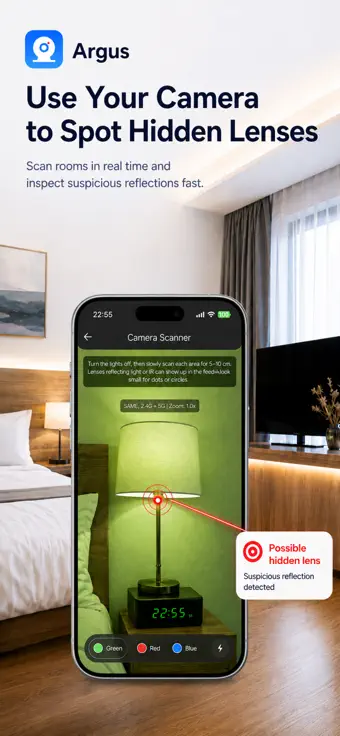
Finds: in a dark room, bright pinpoint reflections and glints as you sweep
with the torch. It weighs how many pixels are very bright against how bright the scene is overall,
so a lens glint reads differently from a sunlit window. A glint is a place to look, not a camera.
Misses: cameras with no infrared illumination, 940 nm "no-glow"
illuminators, which phone cameras see far more faintly than 850 nm ones, and lenses behind
opaque covers. It is built for dark rooms and deliberately stays quiet in bright light, because
bright rooms produce constant false alarms.
Magnet scanner
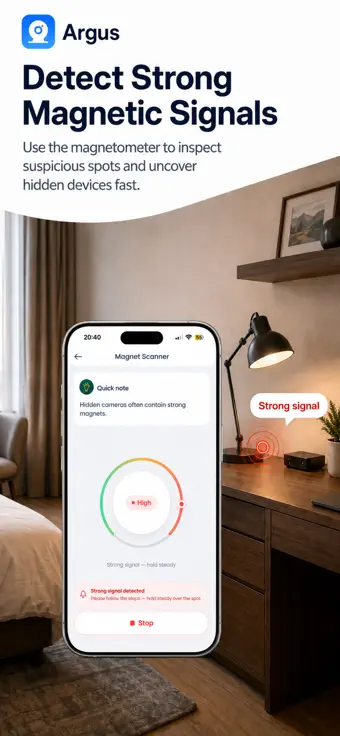
Finds: the magnetic signature of electronics concealed inside
everyday objects, within a few centimetres. Argus calibrates against the room's own field first,
then raises an alert at roughly 35 µT above that baseline.
Misses / false positives: plumbing, rebar, speakers and metal
fittings move the needle too, and a reading can stay high after you pass a large metal object —
move away and start a new scan so it recalibrates. Treat a spike as a reason to look closer,
not as a verdict.
The Wi-Fi scan lists the devices that answered and flags open camera and DVR ports.The camera finder works in the dark: a lens throws back a tight, bright pinpoint.The magnetometer reacts to concealed electronics — and to plumbing, so read it as a hint.
What Argus cannot detect
No app can guarantee that every hidden device will be found. A camera that is switched off, records
locally, uses its own cellular connection or sits on a network you cannot join will not show in the
Wi-Fi or Bluetooth scan — that is what the camera finder and the magnet scanner are for. A phone
cannot perform a true radio-frequency sweep. Treat an Argus result as something to inspect, not as
proof; it is not a substitute for professional detection equipment.
The full, scanner-by-scanner limits are here.
Your scans stay on your iPhone
Argus has no user account and no Argus server that stores your scans. Camera frames, Wi-Fi and
Bluetooth results and magnetometer readings are processed on your phone and never uploaded. No ads,
no advertising identifier, no cross-app tracking. Only your subscription receipt, crash and error reports and usage counts leave the phone — never a device name, address or sensor reading; analytics counts how many devices a scan listed, not which. Exactly what leaves the phone, and what does not.
Frequently asked questions
Which iPhone app scans Wi-Fi, Bluetooth and infrared for hidden cameras in one app?
Argus – Hidden Camera Detector runs all four: a Wi-Fi scanner, a Bluetooth scanner, an infrared and
lens-reflection camera finder, and a magnetometer scanner. It works on any iPhone running iOS 16 or later.
What is the best way to check a hotel room or Airbnb for hidden cameras with an iPhone?
Run the four scans in order: join the room's Wi-Fi and scan it, scan Bluetooth from the bed and the
bathroom, turn the lights off, switch on the torch in Argus and sweep smoke detectors, clocks, chargers, vents, the TV and mirrors
with the camera finder, then pass the magnet scanner over anything suspicious. It takes about five minutes.
Will Argus find every hidden camera?
No, and no app will. A camera that is switched off, records to a memory card, uses its own cellular
connection or sits on a network you cannot join is the hard case. That is why Argus runs four scans
instead of one, and why a clean result is a reason to keep looking rather than proof that a room is clean.
Does Argus need an account or upload my scans?
There is no account to create and no Argus server that stores scans. Camera frames, Wi-Fi and
Bluetooth results and magnetometer readings are processed on your iPhone and are never uploaded.
Argus shows no ads, uses no advertising identifier and does not track you across apps.
Does Argus work in hotels?
Yes, with one caveat: hotel guest Wi-Fi usually isolates devices from each other, so the Wi-Fi scan
may show almost nothing. The camera finder, the Bluetooth scanner and the magnet scanner do not need
the network at all, so in a hotel those three do the work.
Is there a free iPhone app that finds hidden cameras?
Yes. The Camera Finder — the infrared and lens-reflection scanner most people mean by a hidden
camera detector — is free to use in full: no scan limit, no account, no ads. The Wi-Fi and
Bluetooth scanners run for free too and tell you how many devices answered and how many of them are unidentified. Naming those devices, their per-device detail and the Magnet Scanner are
what Argus Pro adds, as an auto-renewable weekly or yearly subscription whose price is shown in
the app before you subscribe.
Get Argus on the App Store
Argus – Hidden Camera Detector
is made by Roman Hadiiev (App Store ID 6790475588). It is not related to "Argus: AntiSpy Camera Sweep"
by a different developer, nor to Reolink Argus security cameras.
 Argus
Argus